

Task Number 09 · Website Design RFP

Information Architecture and Implementation for Rebuilding a User-Centered Web Service

시각, 디지털미디어, 콘텐츠 등
Company Name Microx.co.Ltd
Category Website Design
01

Company Introduction

Microx is a technology-specialized company leading the digital transformation of the distribution and service industries through innovative unmanned payment solutions.
Based on advanced AI vision technology and stable hardware design, the company provides operational efficiency for operators and a seamless payment experience for consumers.
Core Values : Innovation, Trust, User-Centric
Main Businesses : Kiosk development, unmanned store monitoring systems, AI automatic payment solutions, and website development
02

Item Overview (Necessity, Purpose of Use)

Need for Website Design and Development
  • 1. Enhancing Brand Value and Building Trust
    • A website is the digital face of a company. By moving away from outdated design and establishing a professional visual identity, it creates a strong first impression and brand trust for customers.
  • 2. Optimizing User Experience(UX) and Creating Revenue
    • An intuitive interface(UI) improves customers’ access to information and lowers bounce rates. A systematic user journey design becomes a key driver that converts simple visits into practical business results such as purchases or inquiries.
  • 3. Responding to Multiple Devices and the Latest Technologies
    • Implementing a responsive website optimized for various environments such as mobile and tablet devices is essential. By complying with the latest web standards, loading speed can be improved and search engine optimization(SEO) can be achieved, securing marketing competitiveness.
  • 4. Improving Operational Efficiency and Strengthening Security
    • By enhancing the content management system(CMS), operational efficiency can be improved, and customers’ valuable information can be safely protected through the application of the latest security protocols.
03

Item Product Concept (Design Considerations)

  • 1. User Experience and Convenience(UI/UX)
    • Intuitive Navigation : The menu structure should be designed so that users can find the information they want within three clicks.
    • Maintaining Consistency : Fonts, colors, button styles, and other elements across all pages should be unified to maintain brand identity and prevent user confusion.
  • 2. Responsive Web Design and Optimization
    • Multi-Device Support : Responsive design is essential so that the layout can flexibly adapt to screen sizes for each device, including desktops, tablets, and mobile devices.
    • Improving Loading Speed : First-page loading time should be minimized by optimizing image size and reducing code weight. This helps prevent user drop-off.
  • 3. Information Accessibility and Readability
    • Web Accessibility Compliance : Sufficient contrast should be secured and alternative text should be provided for images so that elderly users and people with disabilities can use the website without inconvenience.
    • Typography : Readable fonts, appropriate line spacing, and letter spacing should be set to improve the delivery of text-based information.
04

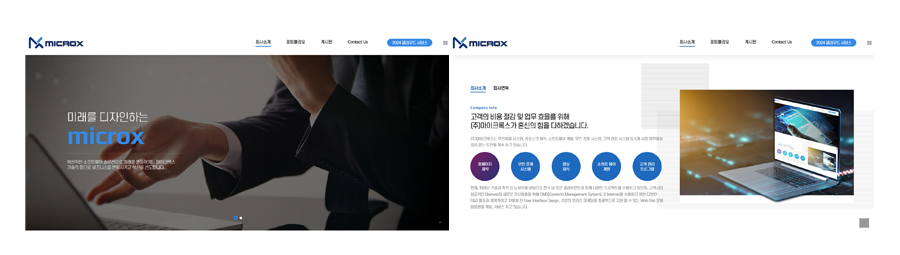
Item Examples

7a54ed95361b6e0ec233cfcd47e6f481.jpg
05

Other Design Requirements

  • 1. Modular Design System Considering Scalability
    • Componentization : Repeated elements such as buttons, input fields, and card news should be designed as modules. This helps maintain design consistency and reduce development time when adding pages or expanding functions in the future.
    • Flexible Layout : A flexible grid system should be applied so that the overall structure does not break even when text becomes longer or images are changed.
  • 2. Design Optimized for Marketing and SEO
    • Text-Based Design : If text is converted into images for design purposes, search engines cannot read the content. Whenever possible, text should be implemented using web fonts, which is advantageous for search exposure(SEO).
    • Landing Page Optimization : Separate landing page designs suited to specific purposes should be considered so that users who enter through advertisements or search results do not leave immediately.
  • 3. Support for Dark Mode and Light Mode
    • Respecting User Settings : The website should be designed to switch modes automatically according to OS settings or provide a manual toggle button.
    • Readability Adjustment : Instead of simply reversing colors, contrast should be redesigned so that eye fatigue is reduced and information is clearly distinguished even in dark mode.
06

Commercialization Plan

  • 1. Target-Specific Customized Content Strategy
    • For B2B Companies : Provide a “labor cost savings simulator” that shows cost reductions when introducing unmanned systems, along with a function for downloading customized proposals for each company.
    • For Small Business Owners : Introduce customized packages by business type(cafes, laundromats, convenience stores) and visualize actual implementation cases(Success Stories).
  • 2. Trust Marketing Based on Technological Capabilities
    • Digital Showroom : Build an “interactive demo” page where users can experience the UI of an actual unmanned payment device on the website.
    • Real-Time Technical Support : Improve response speed for system failure inquiries and introduction consultations by linking with the customer center(CS) and introducing a chatbot.
07

Expected Effects

  • Maximizing Sales Efficiency : Reduce offline sales costs by approximately 20% by establishing an automatic quotation request and consultation application system through the website.
  • Increasing Brand Asset Value : Establish brand identity as a “specialized technology company for unmanned payment” and secure technological superiority within the industry.
  • Securing Global Scalability : Serve as a digital base camp for entering overseas markets through multilingual support and compliance with standard web guidelines.